Push & Pull Changes
Push Changes
Objective
Send committed changes from the local repository to the remote repository.
Steps
- Ensure at least one commit exists locally.
- Right‑click the project.
- Select: Git → Remote → Push
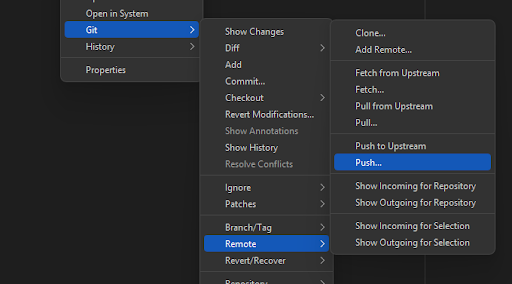
- The Push dialog window opens.
- Verify the remote repository then click Next.

- Verify the local branches then click Next.

- Click the remote branches then click Finish.

Push Changes (Upstream)
Objective
Send committed changes from the local repository to the remote repository.
Steps
- Ensure at least one commit exists locally.
- Right‑click the project.
- Select: Git → Remote → Push to Upstream

Pull Changes
Objective
Retrieve updates from the remote repository and merge them into the local repository.
Steps
- Right‑click the project.
- Select: Git → Remote → Pull

- Verify the remote repository then click Next.

- Verify the remote branches then click Next.

Pull Changes (Upstream)
Objective
Retrieve updates from the remote repository and merge them into the local repository.
Steps
- Right‑click the project.
- Select: Git → Remote → Pull from Upstream
